
How to Choose and Arrange PDF Pages
You can control what pages are included in your directory and the order they appear using the PDF Pages section.
This article walks through how to select pages and arrange them in your directory.
Where to Find PDF Pages
- Log in as an Admin
- Click Customize in the left menu
- Select PDF Pages
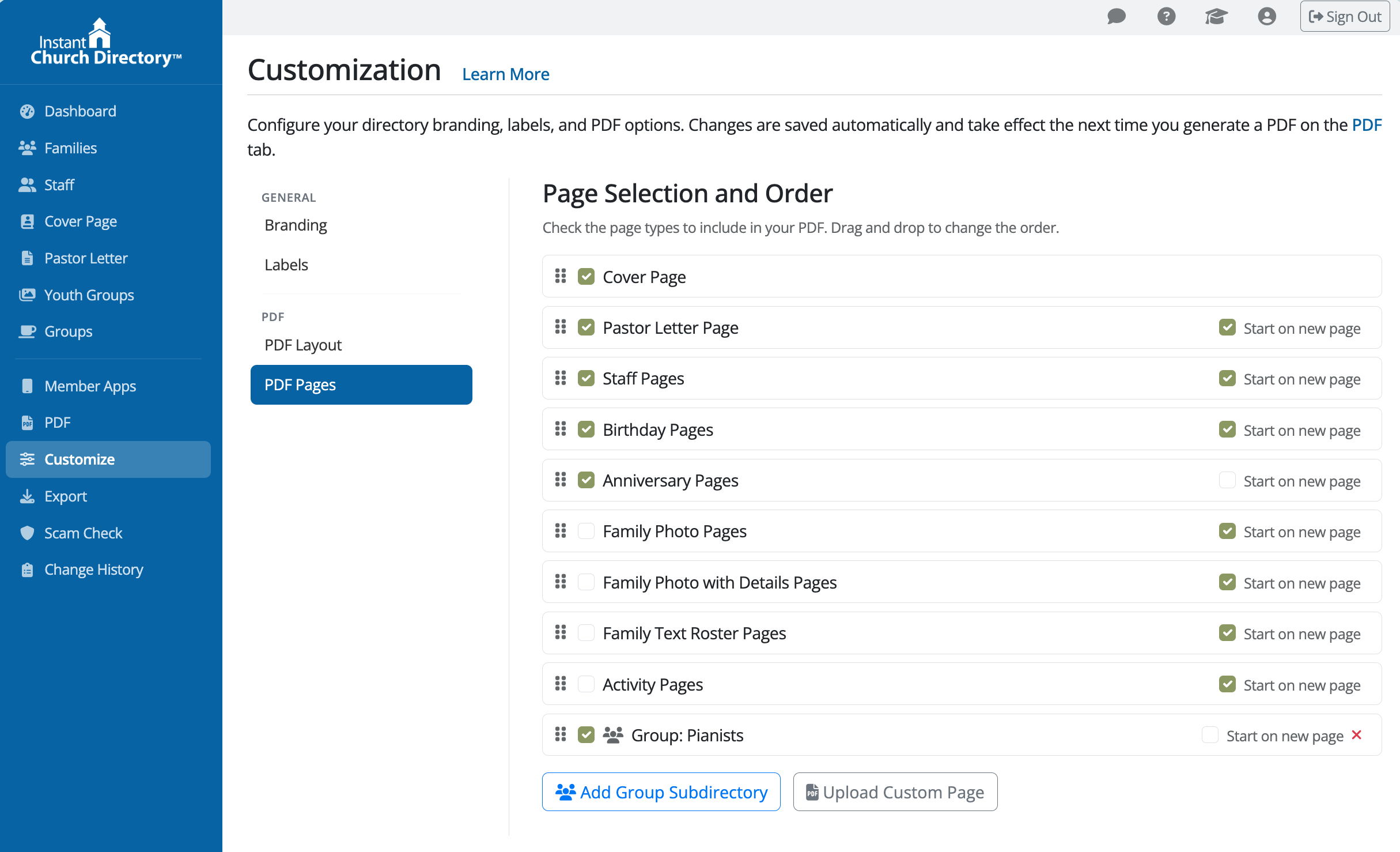
Here you’ll see a list of all available page types.
Adding Group Subdirectories
If you want to include a group in your full directory PDF, you must add it here first. Group subdirectories are not included automatically.
Each group you want to include must be added manually as its own Group Subdirectory page. Once added, it will appear in the PDF Pages list, where you can:
- check or uncheck it to include or exclude it from the PDF
- drag and drop it to change where it appears in the directory
- choose whether it should Start on a new page
Choosing Which Pages to Include
Each page has a checkbox next to it.
- Checked = the page will be included in your directory
- Unchecked = the page will not be included
Simply check or uncheck pages to control what appears in your PDF. In the beta version, you can also check or uncheck Start on a new page for each section.
- Checked = that section will begin on a new page
- Unchecked = that section will continue on the same page as the previous section, if space allows
Arranging the Order of Pages
You can control the order of pages using drag and drop.
- Click and hold the drag handle (icon on the left side of a page)
- Drag the page up or down
- Release it in the desired position
The order shown here is the exact order your pages will appear in the generated PDF.

Common Page Types
You may see some or all of the following:
- Cover Page – your directory cover
- Pastor Letter Page – a message from your pastor
- Staff Pages – staff member listings
- Activity Pages – ministry or group activities
- Family Photo Pages – photo directory
- Text Roster Pages – text-only listing of members
- Anniversary Pages – anniversaries by date
- Birthday Pages – birthdays by date
- Family Detail Pages – detailed household information
- Custom Pages – pages you upload (such as flyers or forms)
- Group Subdirectory Pages – a separate directory section for a specific group
Adding Addtitional Pages
Additional Pages, which are PDF files you create, are uploaded separately and then appear in this list.
👉 See: How to Add and Use Additional Pages in Your Directory
Important Notes
- Changes are saved automatically
- Changes apply the next time you generate your PDF
- The order here affects the PDF only, not the Member App
Troubleshooting
A page isn’t showing in my PDF
- Make sure the page is checked
- Regenerate your PDF after making changes
My pages are in the wrong order
- Drag and drop pages into the correct position
- Regenerate your PDF
My Additional Pages aren’t appearing
- Make sure they are uploaded and checked
- See: How to Add and Use Additional Pages in Your Directory